Mean time to interaction (MTTI)
The MTTI widget retrieves interaction data of triggers from a host group and presents them in a list.
The list is sorted by the mean time to recover and contains information about interaction with that trigger.
The configuration of a MTTI widget offers the following options (aside from the general settings of a widget):
- Host groups: Host groups to include in the report.
- Enter minimum number of problems: Minimum amount of problems that a trigger generated.
- Enter trigger limit: Maximum amount of triggers displayed in the PDF render list.
Render examples
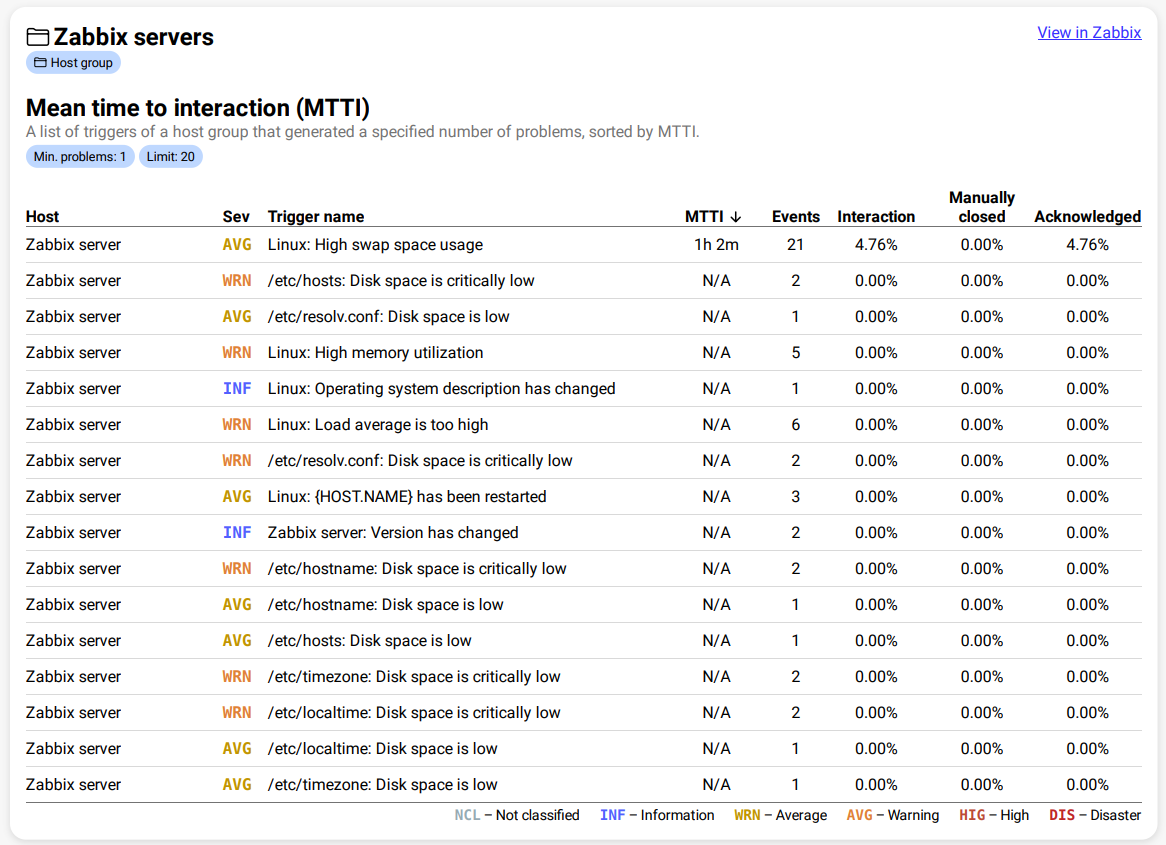
- Host: The source host of the trigger.
- Sev: The severity associated with the trigger.
- Trigger name: The name of the trigger.
- MTTI: The mean time it took to interact with an event generated by the trigger within the report period.
- Events: The amount of events the trigger generated within the report period.
- Interaction: The relative number of
eventsthat have been interacted with. - Manually closed: The relative number of
eventsthat have been manually closed. - Acknowledged: The relative number of
eventsthat have been acknowledged.
{
	"name": "mtti-widget",
	"displayName": "MTTI",
	"description": "MTTI widget",
	"error": "",
	"config": {
		"host_groups": [
			{
				"id": 8,
				"name": "IntelliTrend"
			}
		],
		"min_problems": 1,
		"limit": 10
	},
	"hostgroups": [
		{
			"hostgroup": {
				"groupid": 7,
				"name": "IntelliTrend"
			},
			"triggers": [
				{
					"trigger": {
						"triggerid": 29038,
						"description": "CPU load is too high",
						"priority": 3,
						"hosts": [
							{
								"hostid": 11797,
								"name": "Web Server 01"
							}
						]
					},
					"interactions": 12,
					"manualClosePercentage": 25.0,
					"interactionPercentage": 75.0,
					"acknowledgementPercentage": 66.7,
					"averageTimeToInteraction": 342
				}
			]
		}
	]
}