Role matching
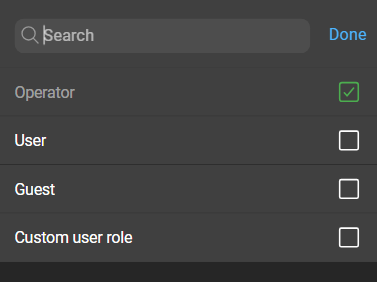
Prisma uses existing Zabbix user roles when importing users. The name of the Zabbix role acts as an identifier to determine whether a corresponding role exists in Prisma. While role names may be identical, their permission sets do not necessarily match.
Role matching in Prisma can result in three outcomes:
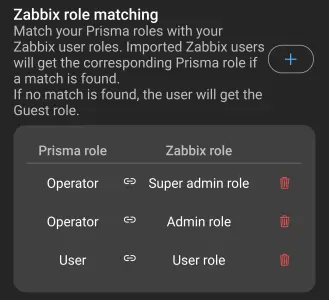
- If a Zabbix role is explicitly matched with a Prisma role, the Prisma role is assigned.
- If a Zabbix role name exactly matches a Prisma role name, the corresponding Prisma role is assigned.
- If no match is found, the user defaults to the
guestrole in Prisma, which has minimal permissions.
Role matching rules can be viewed and edited by navigating to Administration > Zabbix servers, selecting a server, and opening Zabbix role matching. Rules apply only to the selected server.
Adding role matches
To create a new role match, click New role match. This opens a dialog with two fields:
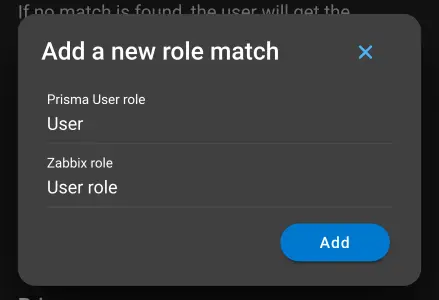
- Prisma role: A role from the list of user roles created in Prisma.
- Zabbix role: A role from those that are available on the Zabbix server.
Changing roles of imported Zabbix users
By default, roles are automatically assigned. If role matching is disabled after import, a role can be assigned manually.
To disable automatic role assignment, navigate to Imported Zabbix users and click the configuration button of a user. This opens the Zabbix user configuration:
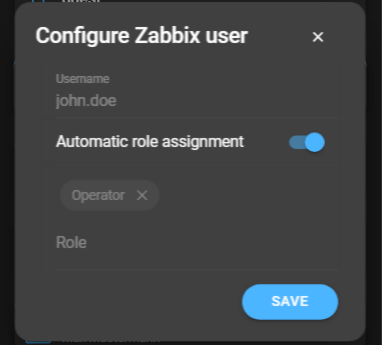
Disabling Automatic role assignment makes manual role selection available. The dropdown displays all default and custom roles.